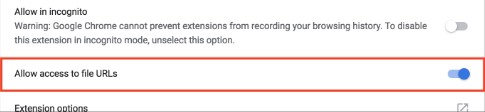
Enable the Allow access to file URLs setting
This guide explains how to enable the allow access to file URL's setting to insert for example PDF files using the Jobrock extension
Enable Allow access to file URLs in the Jobrock extension to open local PDF files in the browser and edit.
- Launch Google Chrome, and select the Extensions icon on the toolbar.

- Select Manage extensions from the menu.
- From the Extensions page, open the Jobrock extension.
- From the extension management page, enable Allow access to file URLs.