How to find my Jobrock client code?
For support Jobrock will always ask you to provide your client code. This article will show you how/ where to find your client code.
| IN THIS ARTICLE |
|---|
| Where to find my Jobrock client code? |
| How to copy my Jobrock client code? |
| What about multi-brand client codes? |
Where to find my Jobrock client code?
To obtain your Jobrock client code hover or click on your name in the upper right corner of your screen in Jobrock (regardless which Jobrock module you are working in).

How to copy my Jobrock client code?
Click on Client code. This will now copy your Jobrock client code to your clipboard and you can paste it where needed.

TIP: When logging a Jobrock support ticket via https://www.jobrock.com/en/support always provide your client code!
What about multibrand client codes?
In case you use a multibrand Jobrock environment set-up always make sure you are in the correct Jobrock environment. Each Jobrock environment (parent or child) has its own Jobrock client code.
You are in a Jobrock multibrand set-up if there's a brand switcher in the upper left corner of your Jobrock environment.
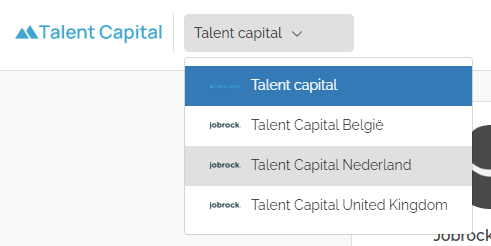
NOTE: Make sure you are in the correct Jobrock environment when copying the code!